Sweep a sketch section along a spine
A sweep moves a closed section along an open spine. The section is drawn on one workplane and the spine on an orthogonal plane derived from it, so you can build pipes, rails, and bent extrusions from two ordinary sketches.
1. Draw the section
- Open the Sketch tab and choose Sketch to 3D options → Sweep sketch.
- Draw and close one or more loops on the selected workplane. Adding a rectangle, circle, or polygon closes the section immediately.
- The editor switches to the spine plane as soon as a loop closes. You can return with Edit section · selected plane to add more loops; nested loops become through-holes, and disjoint loops become separate solids.
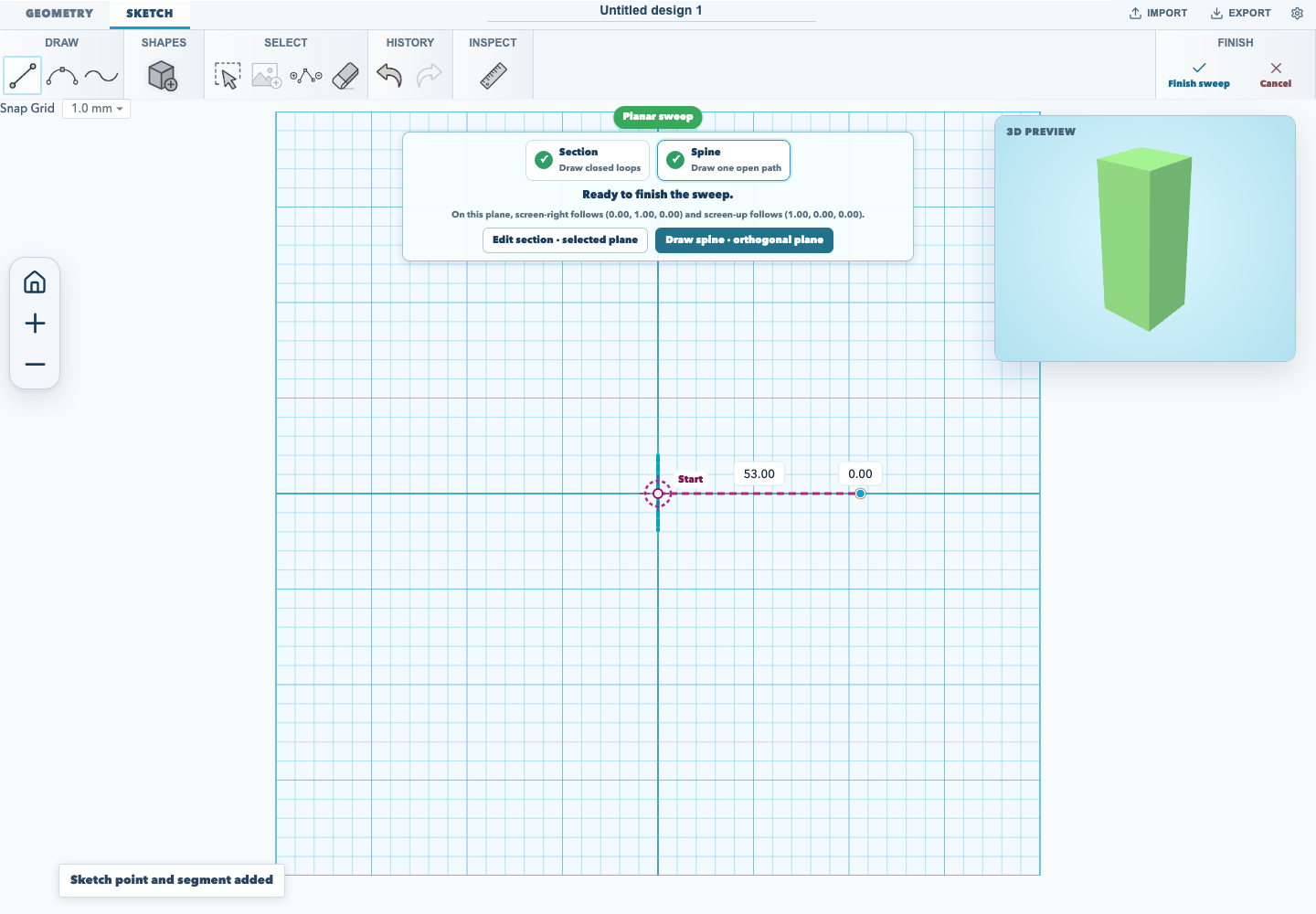
The step panel shows Section with a tick once a closed loop exists.
2. Draw the spine from the start marker
The sweep starts at the section origin. When the spine stage begins, the editor places the first spine point there and draws a crosshair labelled Start. That point is pinned: dragging it shows "The sweep starts at the section origin, so that point stays put" instead of moving the sweep.
- Draw from the start marker. The first segment snaps to screen-right, which is the section normal, so the section stays perpendicular to the initial tangent.
- Add bends by clicking further points. Later segments are free.
- Select a spine point to set its 3D depth (mm) and move it out of the spine plane. Cubic handles have their own incoming and outgoing depth.
The step panel shows Spine with a tick once the open path exists, and Finish sweep stays disabled until a closed section and exactly one spine are present. Its tooltip says what is missing.
3. Watch the 3D preview
A 3D preview inset draws the swept solid while you are still editing the sketch. It updates shortly after each section or spine change, so a wrong direction, a missing hole, or an unexpected twist is visible before you finish.
Centre an off-origin section
The sweep starts at the section origin, not at the middle of wherever the section happens to be drawn. If the section's bounds are off the origin, the step panel says how far and offers Centre section. That moves the section loops and any fixed constraints onto the origin in one undoable step.
Limits
- A sweep needs at least one closed section loop and exactly one open spine.
- The first spine segment must follow screen-right; otherwise the editor refuses the sweep and asks you to redraw it.
- The generated solid is baked. Editing the source sketch rebuilds it, but it is not a general feature-history node.
The browser acceptance test for this workflow is tests/browser/sketch-sweep-ux.test.mjs.
Documentation version: 1.30.0 · Repository revision: 1cb9fee8dff4d394684c229dd67a21da539d167f · View source